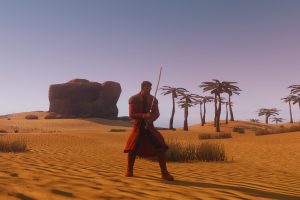


Hunting creatures is a great source of valuable natural resources like oils, skins, bones and more. These resources are sought after by manufacturers and some of the rarest can command high prices.
A large variety of ranged and melee weapons are available. Basic weapons and ammunition can be bought from the Trade Terminal. More advanced weapons and equipment can be bought from the auction, shops or directly from other participants.
To become a truly professional hunter you will need to learn a lot about your equipment and your prey. The range of weapons, armors, modifiers and creatures is vast, and you will need patience, knowledge and skill to become the best.
For this tutorial we will describe hairstyling.
Using the Beautician Panel, the beautician will begin performing the tasks you have requested. Once satisfied, the beautician will add necessary raw materials e.g. hair spray, hair gel etc., and set a price.
The beautician will also see the success rate (SR) for this procedure. The success rate is based on the beautician's skills and the amount of raw materials added for the procedure.
Once the beautician is satisfied with the procedure, he/she will transfer control of the procedure over to the customer by pressing the Propose button.
The customer now has control and may continue to adjust the procedure and review the price and success rate. As a customer in control of the procedure and making changes, it is important to Propose the changes back to the beautician before Accepting. The beautician does not see the changes made until the Propose button is pressed.
Should changes have been made, the customer may Propose new changes back to the beautician, or press the Accept button to accept the beautician's original proposition.
Don't be afraid to use the Propose button. It's a good way to show your beautician what look you are aiming for, and maybe ask for his/her opinion. Control can be shifted many times between both parties using the Propose button, and it is the customer who has the final word by pressing the Accept button.

Manufacturing is initiated by right clicking on any of the different Manufacturing Terminals and choosing Operate from the interaction menu. In order to manufacture an item you must first have the appropriate Blueprint and required raw materials.
The blueprint Item Info panel will contain a list of the raw materials required to manufacture the item.
Basic Blueprints can be bought from Technician NPCs. More advanced Blueprints can be found at the auction. Blueprints must then be stored in special Blueprint Books which are available from the Technician NPC. Blueprints can be stored in Blueprint Books by dragging a blueprint into its appropriate book inside your Inventory.
Once you have the Blueprint of the item you wish to manufacture you are ready to begin the manufacturing process.
Raw materials can be mined, bought from the auction or shops, or purchased through direct trade with other avatars. Most raw materials will need to be refined in order to be used in the manufacturing process.
Access the Manufacturing Terminal for the item you wish to manufacture by right clicking on it and choosing Operate from the interaction menu. There are different terminals for weapons manufacturing, tool manufacturing, armor manufacturing, tailoring etc.
Once you have accessed the correct terminal, the Manufacturing Panel will appear. Select the blueprint of the item you wish to manufacture from the correct Blueprint Book by double clicking on it. The blueprint will be loaded into the upper left corner of the Manufacturing Panel. A list of the required raw materials will also be displayed in the Manufacturing Panel. Drag resources from your Inventory to the space on the right side of the Manufacturing Panel.
If you have the necessary amount of resources, the text will appear in green. If you do not have enough, the text will be displayed in red. For clothing and armor, select the gender of the item using the male and female radio buttons on the Manufacturing Panel. To manufacture the item, click the Manufacture button. To start over, choose Clear. To cancel, choose Exit.
On the bottom-left side of the Manufacturing Panel is the success rate indicator. You have the highest rate of success when the bar is full and green. When red, the success rate on the selected item is low, with a scale in between. Higher blueprint Quality Rating and avatar skills will increase the success rate.
The Quantity/Condition slider allows the manufacturer the option of making fewer items with a higher initial condition (which can be important when making 'Limited' items) or a larger number of items with a lower condition.
If you have the correct left-over residue from previous manufacturing attempts you may add it to the input materials section in the Manufacturing Panel. Residue will then be used in any following successful attempts to boost the item condition. Residue materials that are not detailed in the blueprint ingredient list cannot be used. Failure when manufacturing an item will not waste residue.

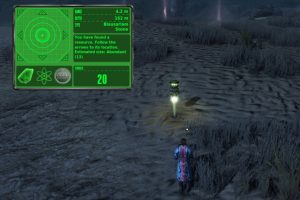
Miners roam the lands in search of resources that can be classified into two major groups: ores and enmatters.
Ores and enmatters being traded are ranging from common to extremely rare resources.
While mining, your avatar will be building a number of skills related to mining that include surveying, prospecting, mining, geology and more.
In order to extract the resources you need to equip the correct Excavator (ore) or Extractor (enmatter) tool, and have the Resource Deed in your Inventory.
Ores
In order to begin the process of finding and extracting ores like gold and copper you will need the following equipment in your Inventory:
-Seismic Bombs
-The Excavator Tool
-The Detectonator Tool
-Enmatters
To begin the process of finding and extracting enmatters like oil and gas, you will need the following equipment in your Inventory:
-The EnMatter Detectonator Tool
-Survey Probes
-The Energy Extractor Tool
Refining
In order to be used for manufacturing, ores and enmatters must be refined. Once the refiner is in your Inventory, equip it by right clicking it and choosing Equip from the interaction menu. By pressing the left mouse button you will activate the refiner and be presented with the refining window. Drag the ore/enmatter from your Inventory into its respective refiner and press Refine. Ores will be refined into Ingots, and enmatters into a range of refined energy products.

Using special clothing pattern Blueprints and tailoring materials a huge range of different clothing garments can be manufactured. Tailoring Blueprint Books are used to store the necessary Blueprints.
Activate a Manufacturing Terminal by right clicking the machine and choosing Operate from the interaction menu.
Open your Tailoring Blueprint Book and double click the blueprint of the garment you wish to manufacture. The Blueprint will be loaded into the Manufacturing Panel.
Add the necessary listed raw materials from your Inventory to the designated area in the machines Manufacturing Panel. View the Blueprint's Item Info for a list of the required materials. Adjust the Quality/Condition slider for desired results.